
How to Troubleshoot and Resolve IP Address Conflicts in Networks?
With the rapid popularization of smart devices, enterprise office equipment, IoT terminals and home wireless devices, local area networks (LANs) have become increasingly complex in scale and structure. IP address conflict is one of the most frequent and harmful network faults in daily network operation and maintenance. This fault occurs when two or more network-enabled devices occupy the same unique IPv4 address within a single LAN segment. It will cause a series of abnormal problems such as intermittent network disconnection, failed data packet transmission, inability to access gateways and external networks, and abnormal device service operation. In severe cases, it may lead to the paralysis of local office networks and suspension of business systems. Therefore, mastering the principles, systematic troubleshooting steps, targeted solutions and preventive strategies for IP address conflicts is a core basic skill for network administrators and operation and maintenance personnel. This article comprehensively expounds on the whole process of IP conflict troubleshooting and resolution, combined with standardized flow charts and practical enterprise cases.
1. Overview and Root Causes of IP Address Conflicts
In the TCP/IP network protocol system, each device accessing the LAN must rely on an independent IP address to complete data encapsulation, transmission and reception. The router and switch identify network devices and forward data packets based on IP addresses. When IP duplication occurs, network devices cannot correctly distinguish data sources and destinations, resulting in packet loss, transmission delay and network communication failure. IP address conflicts in actual network environments are not accidental, and most of them are caused by non-standard network configuration and imperfect address management mechanisms.
1.1 Two Core Types of IP Conflicts
The mainstream causes of IP conflicts in LANs can be divided into two categories, covering almost all faulty scenarios. The first is static IP configuration conflict. In enterprise networks, administrators usually set fixed static IP addresses for servers, printers, monitoring equipment and fixed office computers to ensure long-term stable network access. Conflicts occur when different administrators repeatedly allocate the same IP address or fail to update the IP usage record after equipment replacement. The second is DHCP dynamic allocation conflict. Routers and DHCP servers automatically assign IP addresses to terminal devices. When static IP devices are not excluded from the DHCP address pool, or the DHCP server has address lease update errors, newly accessed dynamic devices will occupy existing static IPs, triggering conflicts.
1.2 Network Topology of Typical IP Conflicts
The following topological diagram shows the most common IP conflict scenario in a typical office LAN, which intuitively reflects the mechanism of network failure:
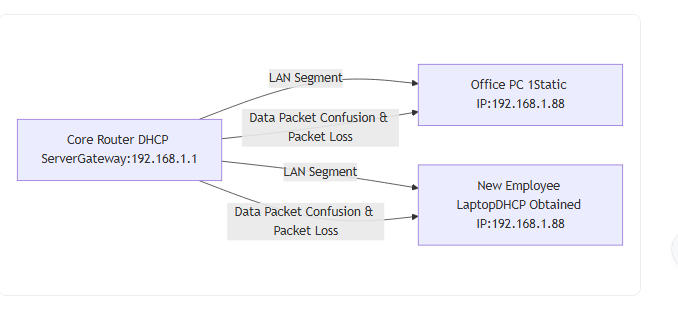
As shown in the topology, when a static IP device and a dynamic DHCP device share the same IP address, the router cannot identify the target device of data packets, resulting in mutual interference of device networks and continuous network anomalies.
2. Standardized Troubleshooting Process for IP Conflicts
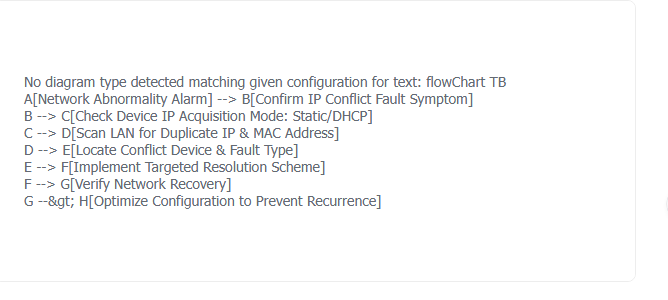
Most network personnel solve IP conflicts by blindly modifying IP addresses, which cannot locate the root cause and easily lead to repeated faults. Standardized layered troubleshooting can quickly locate conflicting devices and fault sources, improving maintenance efficiency. The complete closed-loop troubleshooting process is shown in the flowchart below.
2.1 Full-Set Troubleshooting Flowchart
2.2 Fault Confirmation and Device Location Method
First of all, confirm the fault symptom. Windows devices will pop up a clear "IP address conflict" prompt, with obvious phenomena such as intermittent disconnection and failure to access shared folders. Linux, Mac and mobile devices have no popup prompts, but faults can be judged through network detection: high delay, frequent packet loss, normal display of network connection but inability to access the Internet and intranet servers. After confirming the fault, locate the conflicting devices accurately. For Windows terminals, run the ipconfig /all command to view local IP configuration, and use the ping and arp -a commands to scan LAN device information. For Linux devices, the arp-scan command can scan all online devices in the segment, match duplicate IP and unique MAC addresses, and accurately distinguish illegal conflicting devices, because MAC addresses are globally unique and will not be duplicated.
3. Practical Solutions and Real Fault Case Analysis
According to different conflict types, targeted emergency solutions and permanent optimization schemes are adopted. Combined with real enterprise operation and maintenance cases, the actual operation effect and problem-solving ideas are explained in detail.
3.1 Solution for Static IP Configuration Conflicts
For conflicts caused by manual static IP setting errors, the fastest emergency solution is to modify the IP address of one conflicting device. Administrators need to select an idle IP address outside the DHCP address pool of the network segment, fill in the correct subnet mask and gateway address, and test the network connectivity after modification to ensure normal access to the intranet and external network. For long-term management, it is necessary to sort out the static IP address list of all fixed equipment in the network to avoid repeated allocation.
3.2 Solution for DHCP Dynamic Allocation Conflicts
Temporary DHCP allocation errors are the main cause of home and small office network conflicts. For Windows devices, execute the ipconfig /release command to release the occupied IP address, and then run ipconfig /renew to re-obtain a valid IP address from the DHCP server. For Linux devices, use the dhclient -r command to release the address and restart the network service to refresh the network configuration. This method can quickly solve temporary address lease errors and dynamic allocation conflicts.
3.3 Real Enterprise IP Conflict Troubleshooting Case
A small and medium-sized enterprise office network with 50 terminals suddenly suffered from large-area network disconnection. After preliminary inspection, the operation and maintenance personnel confirmed that there was an IP address conflict in the 192.168.1.0/24 network segment. Through ARP scanning, it was found that the IP address 192.168.1.100 corresponded to two different MAC addresses. After checking the equipment list, it was confirmed that the enterprise file server was set with a static IP of 192.168.1.100, while a newly connected employee desktop computer automatically obtained the same IP via DHCP, causing the conflict. The root cause was that the static IP of the server was not added to the DHCP address exclusion list of the router. The operation and maintenance personnel immediately refreshed the desktop computer IP to restore the network, and optimized the router configuration, added all fixed equipment static IPs to the exclusion list, and established a unified IP management table. Since then, no similar conflict faults have occurred, which completely solved the hidden danger.
4. Long-Term Prevention and Network Configuration Optimization
Solving IP conflicts only eliminates temporary faults, and standardized network configuration management is the fundamental way to avoid repeated faults. For enterprise networks, a complete IP address management system should be established, including static IP registration, equipment filing, and regular network segment scanning. Administrators can enable the DHCP address reservation function to bind fixed IP addresses to the MAC addresses of servers and office equipment, ensuring exclusive address use. At the same time, turn on the router's built-in IP conflict detection function, which can automatically alarm and intercept duplicate IP access in real time. For home and small office networks, it is recommended to uniformly use DHCP dynamic IP acquisition, reduce manual static configuration, and simplify network management difficulty.
5. Conclusion
IP address conflict is a basic but high-risk network fault, which essentially stems from non-standard network configuration and incomplete address management. Different from blind troubleshooting, systematic fault confirmation, accurate device location, and targeted classified solutions can efficiently resolve network anomalies. Combined with actual enterprise operation and maintenance cases, it can be seen that temporary emergency repair can restore network service, while standardized configuration optimization and perfect management mechanisms can fundamentally prevent the occurrence of IP conflicts. Skilled mastery of IP conflict troubleshooting methods and preventive strategies is crucial to ensuring the stability, efficiency and security of LAN operation, and is an indispensable core capability for network operation and maintenance work.