
Linux, an open-source and Unix-like operating system, dominates servers, embedded devices, and cloud computing platforms worldwide. Its stability, flexibility, and high security stem from its rigorous underlying structural design and concise command-line operation mechanism. A solid grasp of Linux basic commands and underlying system structure is the foundation of proficient Linux operation, system maintenance, and secondary development. This article systematically analyzes core Linux commands and its internal operating principles.
1. Overview of Linux Underlying Structure
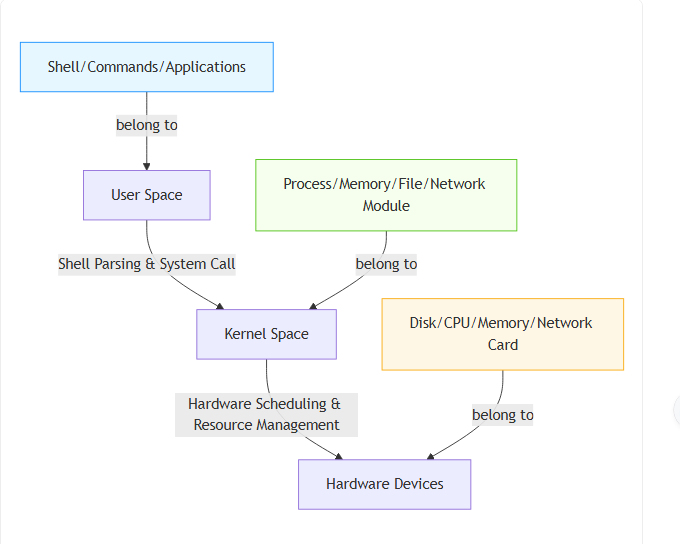
The Linux system adopts a classic layered architecture, mainly divided into user space and kernel space. This isolation mechanism effectively protects core system resources and ensures operational stability. User-space commands and applications cannot directly access hardware; they need to request resources through the kernel. The layered operating logic is clearly shown in the following architecture diagram.
1.1 Core Kernel Architecture
The Linux kernel undertakes core system management tasks, including process scheduling, memory management, file system management, and hardware driver control. Different from closed-source operating systems, the Linux kernel provides unified system call interfaces for upper-layer applications. All command operations essentially trigger kernel system calls to complete resource allocation and hardware interaction. For example, file reading and writing and process creation are all implemented by invoking kernel underlying functions, ensuring unified and standardized system operation.
1.2 Tree-Type File System Structure
Linux features a unique single-root tree file system, starting from the root directory marked with “/”. Unlike Windows with multiple independent disk partitions, all hardware devices, files and directories in Linux are uniformly mounted under this tree structure, realizing unified resource management. The core directory hierarchy is displayed in the tree diagram below.
This standardized hierarchical structure is the prerequisite for all file operation commands. All directory switching, file creation and deletion behaviors are expanded based on this tree logic, greatly simplifying system resource management.
2. Classification and Application of Linux Basic Commands
Linux abandons graphical operation limitations and relies heavily on command-line tools to implement system management. Basic commands are user-space encapsulated tools, which transmit operation instructions to the kernel through the shell interpreter, realizing efficient system control.
2.1 File and Directory Operation Commands
File operation is the most basic Linux operation scenario. Common commands include ls for viewing directory contents, cd for switching working directories, mkdir and rmdir for creating and deleting directories, and cp, mv, rm for copying, moving and deleting files. These commands directly act on the tree file system. For instance, the ls command obtains directory file information by calling the kernel’s file traversal system interface, while the rm command releases file storage space through kernel resource recycling mechanisms. Flexible combination of these commands can complete daily file management efficiently.
2.2 System and Process Management Commands
To ensure stable system operation, Linux provides dedicated process and system monitoring commands. The ps and top commands are used to view real-time process status, including process ID, memory occupancy and CPU usage. The kill command can terminate abnormal processes by sending system signals. In addition, df and du commands check disk usage, and free commands monitor memory resources. These commands reflect the kernel’s process scheduling and resource monitoring capabilities, helping users locate system faults and optimize operating status in a timely manner.
2.3 Permission and Network Commands
Security and network communication are core advantages of Linux. The chmod and chown commands are used to modify file access permissions and owner identities, matching Linux’s unique user-group permission mechanism to prevent unauthorized access. Common network commands such as ping, ifconfig and curl can test network connectivity, view network parameter configurations and obtain network resources. These commands rely on the kernel’s network protocol stack and permission control modules to ensure secure and stable network transmission and system access.
3. Logical Connection Between Commands and Underlying Structure
There is an intimate logical correspondence between Linux commands and underlying system structures. All command-line operations are not independent superficial behaviors, but external manifestations of kernel underlying operating mechanisms. The Shell acts as a core bridge connecting users and the kernel, and the complete command execution workflow is summarized in the flowchart below.
The entire execution process relies on the layered architecture and core modules of the Linux system. Simple commands such as ls and ps essentially trigger different kernel module calls to complete resource query and feedback.
Meanwhile, the tree file system standardizes the operation objects of all file commands, and the kernel’s resource scheduling mechanism defines the execution rules of process and system commands. Understanding this underlying logic allows users to break away from mechanical command memorization, accurately judge command execution principles and error causes, and significantly improve the efficiency and accuracy of system operation and maintenance.
4. Conclusion
Linux’s powerful performance originates from its rigorous underlying kernel design and standardized file system architecture, and basic commands are the most intuitive way to interact with the system. Mastering common Linux commands and deeply understanding their underlying operating principles can help users get rid of rigid operational thinking, realize flexible system management, and lay a solid foundation for in-depth learning of Linux cloud computing, server operation and maintenance, and embedded development.